The most productive tool for trading Dr. Ken Long's method on Interactive Brokers.
It does the math. Type the dollars you will risk and Edge S2 Desktop sizes the shares from his R unit, sends the entry with its stop and its target to IB as one bracket, and scores every trade in R. His indicators are on the chart. You read it and manage the trade.
You know the setup. The ticket is where it goes wrong.
Shares worked out in a hurry. A stop placed after the fill. A second entry that loses track of the first. Edge S2 Desktop does that arithmetic on Dr. Ken Long's own indicators and keeps every leg's stop resting at Interactive Brokers, so what is left for you is the trade itself: where to get in, when to move the stop, when to leave.
The entry is a fast decision. The arithmetic should not be.
Daniel Kahneman called the fast mind System 1 and the slow, checking mind System 2. On a live chart, System 1 reads the setup in a second. System 2 is the one that sizes the position, sets the stop and keeps it there. Edge S2 Desktop is System 2 at the ticket, wired to your Interactive Brokers account and built on Dr. Ken Long's indicators.
Daniel Kahneman, Thinking, Fast and Slow, 2011.
$999 Free during the beta.
The price is $999 at general release. During the beta we are giving it away free in exchange for your feedback.
Six minutes
Where to begin.
Eight chapters, 6:20. Press a chapter to go to it. The same video opens inside the app from Help → Where to begin.
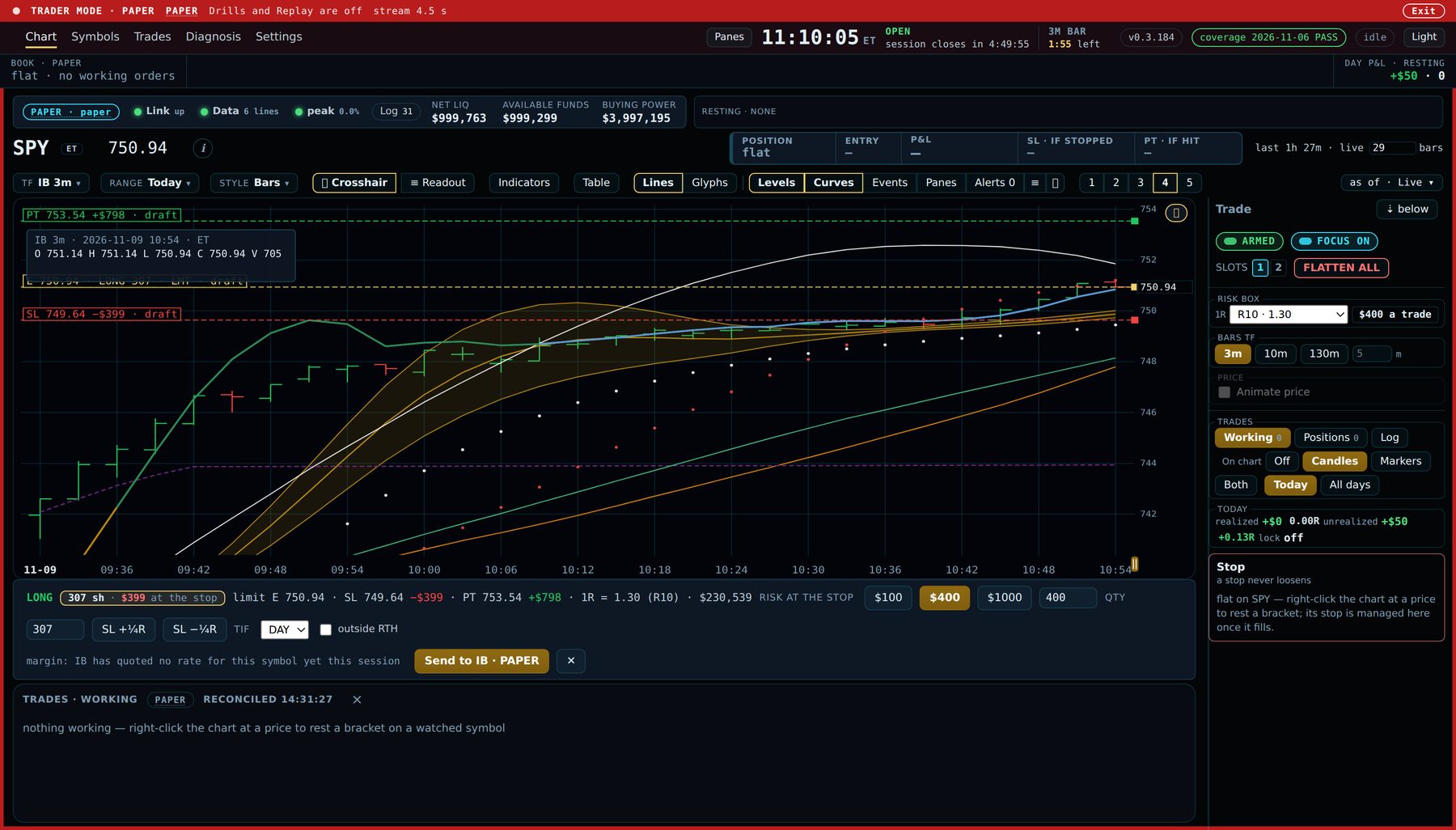
The ticket, on an IB paper account. Risk typed: $400. His R unit for the day: 1R = 1.30 (R10). The app answers 307 shares, draws the entry, the stop at −1R and the target at +2R on the chart, and writes what each one is worth before you press Send to IB. The yellow note under the ticket is IB's own word on margin, read back in plain English.
What the app takes off your hands
The math is the app's job. The trade is yours.
Shares from risk.
You type the dollars you are willing to lose on this trade. The app divides them by the R unit (R10 on the chart, or one of your own) and sizes the position. Presets for $100, $400 and $1,000 sit on the ticket.
$400 ÷ 1.30 → 307 shEntry, stop, target. One order.
Right-click the chart at a price and the bracket is drafted there. One press sends all three to IB together, so the stop is resting at the broker from the moment the entry fills, never only on your PC.
E1 · E1.SL · E1.PT → Send to IBMoves in R, never loosens.
Trail the stop by the quarter R, the half R or the full R, lock it at no-lose, or exit at market, each from one button. A stop never loosens: a drag that would widen it is refused.
+¼R · +½R · +1R · NL · EXITEvery fill in $ and R.
A row per bracket with its legs, the day in R, a histogram of today's trades, and the account's history with its peak and its drawdown. Every dollar figure says whether it is IB's or the bracket's own.
+$1,031 if hit · +2.57RThe numbers behind the ticket
Dr. Long's indicators, as the Owl Group draws them.
The R unit, the risk box, RL10 and its seasons, the Dragon, the River, the Z bands, the R5 and R10 rungs from the open, and the projection with its turn marker are on the chart from the first launch, as the KL preset. Each one is computed by the same code the Edge platform runs, and every description says what the line measures and never where price is going.
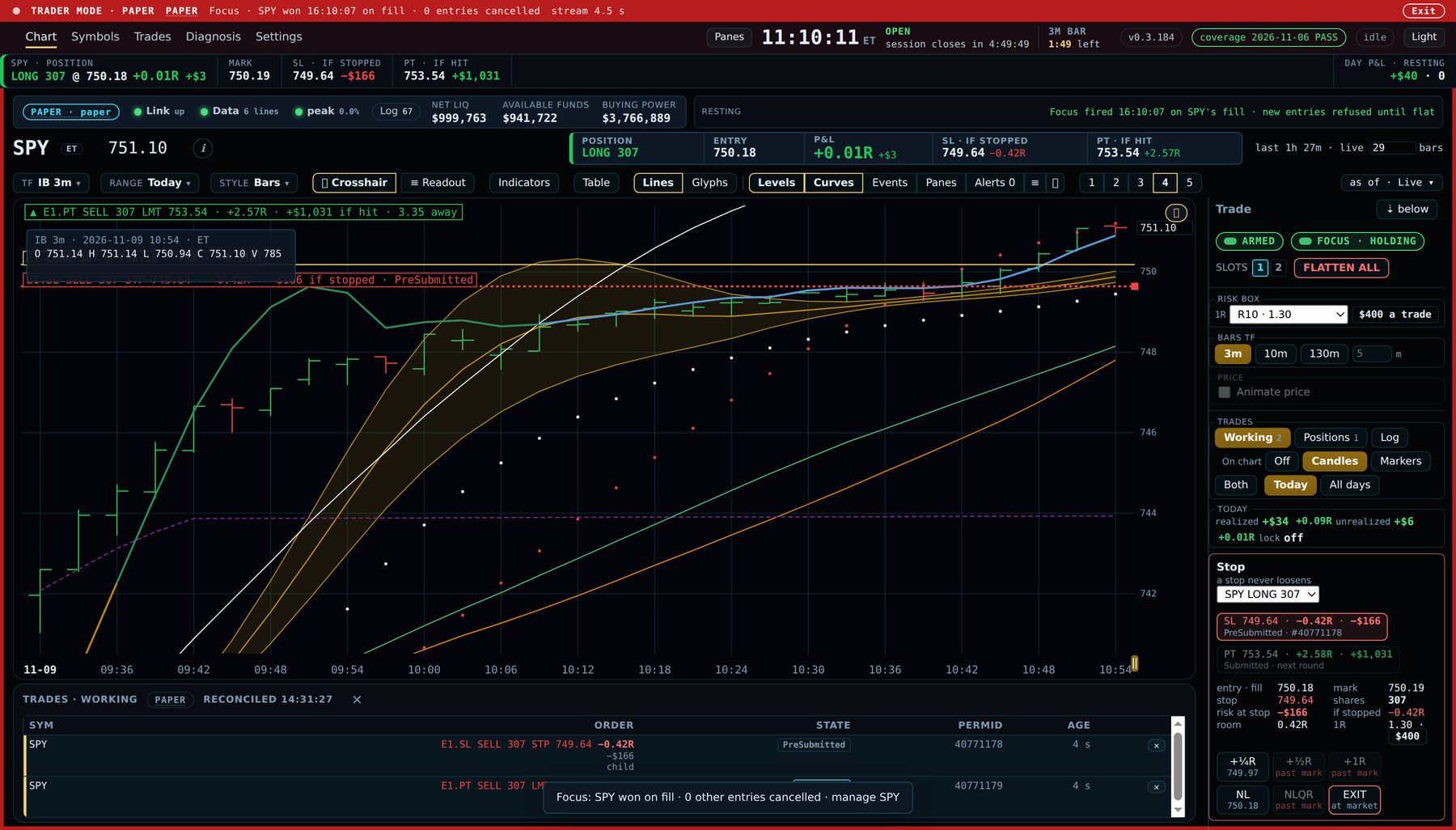
After the fill. Long 307 SPY at 750.18. The stop at 749.64 and the target at 753.54 are both resting at IB, each read in R and in dollars. The Stop panel on the right is the whole of trade management: +¼R, +½R, +1R, NL, EXIT. Focus took the other waiting entries down the moment this one filled, so you are managing one trade, with the strip reading the day in R.
Order management
Add, merge, split, flatten. The stop is never off.
IB keeps one position per symbol at one average cost. The desktop keeps each bracket you placed as its own leg, with its own entry, its own risk and its own stop, until you say otherwise.
- Legs Add 500 to a long of 200 and the chart reads two lines, E1 LONG 200 @ 181.24 and E2 LONG 500 @ 183.10, each with the risk you typed on its ticket and its own R. The position row is the sum, with the blended entry IB would show.
- Merge Joins legs under one stop and one target. The new pair is placed and acknowledged at IB before the old ones are cancelled, so the shares are never without a stop.
- Split Cuts one leg in two, each slice with its own stop and target, by half, a third or a number of shares. If IB refuses one slice, what was placed is cancelled and the old pair stays.
- Focus Rest brackets on several names and let the market pick. When one entry fills, the others are cancelled, and new entries are refused until you are flat.
- Flatten One press closes everything at market. Cancel, Exit and a resting stop's move keep working even while a cool-off lock refuses new entries.
- Alerts One sentence the chart watches for you, drawn from a line or a price. Tick and frame and the alert carries a whole bracket, decided in advance: side, entry, stop, target. When it fires, the toast offers Send. Only your mouse press sends it. No timer and no key does.
What the app will never do: pick a direction, forecast a price, or send an order you did not press. Every number on screen is a description of past bars or a figure from your broker, and the line under the chart says which.
Three steps to live
Practice. Paper. Then your account.
- Practice on a closed market day. Pick a symbol and a day. The clock runs, you place brackets, and a book on your PC fills them. No money moves and nothing reaches Interactive Brokers. Repeat until placing an order, moving its stop and getting out take no thought.
- Trade on paper with IB's own practice account. The live market, IB's fills, no money. The setup walks you through the paper login one screen at a time. The Trades panel keeps every day in $ and R.
- Go live, turned on by request after you have traded on paper. The same ticket, the same Stop panel, the same rails. The book is marked LIVE and nothing else changes. Your IB login stays on your PC; Edge S2 never holds it.
Between trades
Rails for the account. Zero State for the trader.
A soft cap on the day, a cool-off timer that offers to step in at −2R or three stops in a row, and a Lock Trade that refuses a new entry until the time shown while every exit keeps working. A banner at ten percent off the account's peak. IB's margin refusals in plain words, with about how many shares would fit.
And Dr. Long's Zero State on a stage of its own: Operation GFI, the Owl meditations read aloud, Sniper Preparation before the day and Sniper Clearing after a trade. Nothing on that stage trades or shows money.
Cost
How much does this cost?
-
Edge S2 Desktop
$999Free during the beta $999 at general release. During the beta we are giving it away free in exchange for your feedback. Windows 10 or 11. Download, install, practice on a closed day the same hour. - Your broker your own IB account Paper and live orders go through your own Interactive Brokers account and the IB Gateway on your PC. Your login and your market-data subscriptions are yours; Edge S2 holds neither.
- Market data from IB The bars on the chart are Interactive Brokers' own, served through your account and the IB market-data subscriptions you hold. Nothing else to connect.
Let the app do the math. You manage the trade.
Edge S2 — The Trader's Second Brain
Every trader carries a fast, intuitive mind that reads the chart and feels the moment. Psychologist Daniel Kahneman called it System 1. It is quick, and under market pressure it reaches for fear, hope, and the story that feels right. Edge S2 is the trader's System 2 — the slow, analytical second brain that checks the instinct against the evidence before capital is at risk. Edge S2 is an integrated platform for systematic trading.